blackcat - the BlackCat agent
New here? Read HOW_TO_USE.md first. It is a timed,
start-to-finish guide: Python, the.venv, the editable[tui]install,
a DeepSeek API account and top-up, the API key, and the first run of
blackcat --yolo tui, written for someone who has never done any of it.
About 45 minutes, no prior knowledge assumed.Repository root: https://molodetz.nl/repos/blackcat. Clone it with
git clone https://molodetz.nl/repos/blackcat, thencd blackcat. Every
path below is relative to that directory; the.venvthis project expects
lives there, and theMakefiletargets (make setup,make test,
make tui) operate on it.
blackcat is a DeepSeek/OpenRouter-powered agent package (this directory's auth.md brief,
resolved via current platform research), exposing the blackcat binary.
| Piece | What |
|---|---|
HOW_TO_USE.md |
Start-to-finish noob guide: Python, .venv, editable [tui] install, DeepSeek account + top-up, API key, first run |
docs/BLACKHAT.md |
Adversary-side field manual: jailbroken DeepSeek agents, documented incidents, underground pricing, unit economics, enforcement record, hype ledger |
docs/JAILBREAKING.md |
Research survey of jailbreaking, in two halves. Parts I-V, defence: cost-ordered attack taxonomy (prompt space through weight ablation), annotated evidence tables for attacks and defences, measurement protocol, 40-entry bibliography. Part VI, operator: the same evidence priced as a business - pipeline, recon, corpus, harness, delivery, maintenance treadmill, detection audit, unit economics, attribution - with its own timeline, glossary, number card and stage index |
| AGENTS.md | Agent rules: hard rules, conventions, TUI quality rules |
| docs/DEFINITION_OF_DONE.md | Delivery checklist every task must pass |
| CHANGELOG.md | Version history, one row per change |
Makefile |
Developer shortcuts over ./.venv: make setup, install, test, lint, run, tui |
pyproject.toml |
Project metadata; runtime deps: aiohttp, stealthii (Textual is the optional tui extra); entry point blackcat |
blackcat/agent.py |
BlackCatBot - prompt(), search(), fetch(), run_tool(), transcript, save_report(), AW limit + compaction |
blackcat/client.py |
DeepSeek + OpenRouter APIs: chat, Fetch, native vision |
blackcat/fstate.py |
Read-state, mtime+hash staleness guards, N:hh line IDs, path security, atomic writes |
blackcat/tools.py |
File tools: read, grep, outline, edit, multi_edit, write_file, apply_patch; shell execution: bash (BashTools); concurrent multi-file fetches: download (DownloadTools) |
blackcat/http.py |
One shared Chrome-identity aiohttp client plus StealthFetcher (real-Chromium first fetch step) |
blackcat/browse.py |
Autonomous browsing as a tool: ref-based BrowserTools, headed/headless stealthii, single-task sub-agent runner |
blackcat/cli.py |
The blackcat binary: interactive chat (default), prompt, search, fetch, models, tui |
blackcat/dsml.py |
DSML leak recovery: leaked tool-call markup parsed back into real calls, history repaired |
blackcat/rsearch.py |
rsearch web-search backend (no key); the sole search backend |
blackcat/searxng.py |
SearXNG meta-search client (self-hosted, no key); search fallback |
blackcat/scholar.py |
Scholarly vertical: arXiv + Semantic Scholar, merged and deduplicated |
blackcat/reader.py |
Jina Reader fetch fallback (URL to Markdown, no key required) |
blackcat/repo_index.py |
Persistent FTS5 repo index: BM25 path/line/snippet/score hits |
tests/test_blackcat.py |
Committed tests (stdlib unittest, no network) |
tests/test_dsml.py |
DSML tests: parser shapes, strict rejects, loop recovery, nudge bounds |
tests/test_search.py |
Search tests: fallback chain, scholar, reader, repo index (mocked) |
tests/test_tools.py |
File-tool tests: staleness, CRLF/retab safety, atomicity, patches |
tests/test_context.py |
AW-limit tests: tiered clearing, compaction, memory flush |
Install
python3 -m venv .venv
source .venv/bin/activate
pip install -e '.[tui]'      # editable, with the Textual TUI extra
The .venv directory is the one the Makefile expects: make setup does
exactly the three steps above. Step-by-step, with timings and the API-key
walkthrough: HOW_TO_USE.md.
Use
Each live provider reads its key from --api-key, else its env var
(DEEPSEEK_API_KEY for deepseek, OPENROUTER_API_KEY for openrouter,
BLACKCAT_API_KEY covers both), else a .env file in the working
directory (BLACKCAT_ENV_FILE overrides the path). .env holds lines
like DEEPSEEK_API_KEY=... and is git-ignored - never commit it.
blackcat                                            # interactive chat, live deepseek (default)
blackcat prompt "hi"                                    # live deepseek-flash
blackcat --provider echo prompt "hi"                    # offline echo
blackcat --provider deepseek prompt "describe" --image photo.png
blackcat --provider openrouter prompt "hi"              # live openrouter/auto
blackcat --provider deepseek search "DeepSeek V4.1 Flash" --count 5
blackcat --provider deepseek fetch https://example.com
blackcat --provider deepseek models
blackcat prompt "hi" --out blackcat-report.json             # full JSON report
Chat tips: Up/Down recalls prompt history (persisted to
~/.blackcat_history, BLACKCAT_HISTORY_FILE overrides the path);
Shift+Tab inserts a newline without sending, a trailing \
continues on the next line, and multiline pastes arrive as one prompt.
Two ways to run a model
Same weights, same API key, same billable tokens. The harness is the whole
difference between a chat box and an operator.
| The noob build | The pro build |
|---|---|
 |
 |
| One prompt in, one answer out. Nothing touches disk, nothing survives the tab closing, and every step is retyped by hand. | Tools, sandbox, approvals, a harness-kept task list, session resume and a live cost ledger: the model can act, recover from its own errors, and keep going for hours. |
The left column is not a strawman, it is where most people stop: the model
answers, the human copies, the human pastes. The right column is what this
repo ships - read/grep/edit/apply_patch on real files, bash with
real exit codes, a real Chromium behind browse, download for bulk
retrieval, and --session so an interrupted run resumes instead of
restarting. The same harness that makes that productive is what makes a
jailbroken agent dangerous, because the model stops being an advisor and
becomes an operator with your credentials, your shell and your filesystem.
The other side of the same lever
Take this harness, point it at a model whose refusals have been ablated or
jailbroken, run it with --yolo on a box that holds real credentials, and
you have the thing described in docs/BLACKHAT.md.
That document is written from the adversary's chair on purpose: what a
jailbroken DeepSeek agent is actually used for in the wild, the documented
cases (Unit 42's DeepSeek-over-Telegram operator, the s1ngularity npm worm
that drove Claude Code, the postmark-mcp backdoor, EchoLeak and
ForcedLeak), the underground price sheet, the unit economics of a
jailbreak wrapper, the NSFW companion market, where the margin really sits,
and the failure modes that end people - including the one where the model
robs you.
TUI harness
blackcat tui launches the full-screen Textual
harness (needs the optional extra, installed into the repo checkout:
pip install -e '.[tui]'): every tool call renders
as an animated card (inline diffs, search rows, convergence
mission-control), with a session rail (touched files, context gauge,
live cost), Diff/Costs/Report/Models/Help tabs, approval cards for
mutating tools, a command palette (Ctrl+P), slash commands (/costs,
/diff, /scholar <q>, /repo <q>, …), and three themes. The core needs only aiohttp and stealthii;
the TUI adds Textual. Full visual spec in
design.md. All flags (--provider, --model, --api-key,
--tools-root, …) apply to tui exactly as to chat.
Two TUI-specific behaviors: terminal logging is fully silenced while
the TUI runs (log output would corrupt the display); pass
--log-file blackcat.log if you want the log in a file instead. And
tui takes an optional first prompt, submitted the moment the
harness opens. When a prompt is given, the app is a one-shot run:
it quits by itself as soon as that first turn is completely done
(reply fully shown, or the turn failed). Without a prompt it stays
open for interactive use:
blackcat tui "fix the failing tests in tests/test_tools.py"
blackcat --yolo tui "build the whole app"   # same, hands-free
Container: blackcat dockerize
One command puts the checkout in a container and opens the TUI in it:
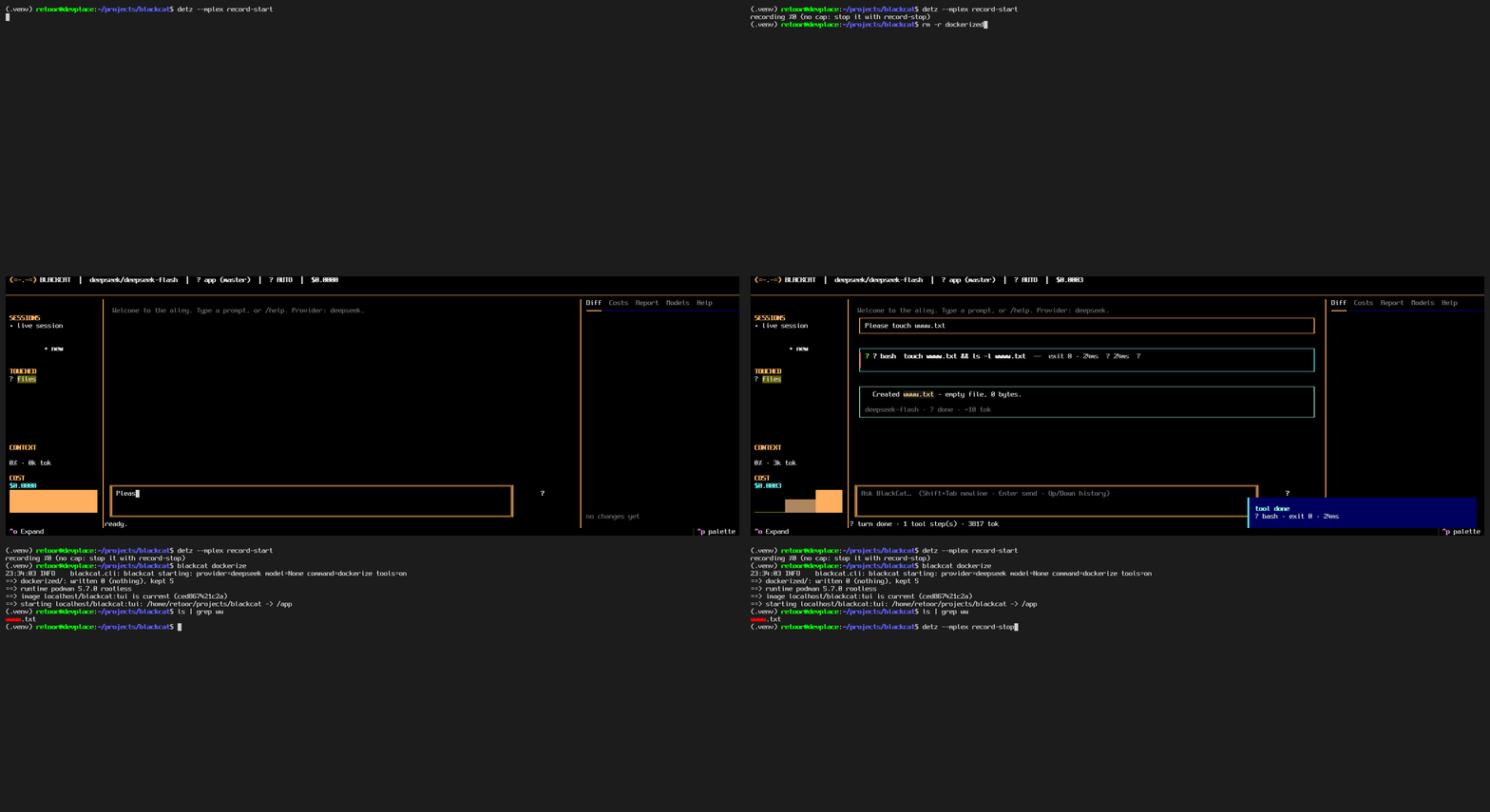
blackcat dockerize                       # build if needed, run the TUI
blackcat dockerize --shell               # bash in the same container
blackcat dockerize -- --provider echo tui   # pass arguments to blackcat
blackcat dockerize --stop                # remove the container
blackcat dockerize --rm-image            # remove container and image
It creates dockerized/ when it is missing (Dockerfile, entrypoint.sh,
Makefile, README, smoke test) and never overwrites your edits there unless
you pass --force. Then it fingerprints the build inputs - that
Dockerfile, the entrypoint, pyproject.toml, README.md, the browser
flag - and compares that digest with the org.blackcat.fingerprint label
on the image. Missing or stale means build; current means reuse. Editing
source files needs no rebuild at all, because nothing is copied.
The difference from the old baked setup is deliberate: the project
directory is bind mounted at /app. The agent edits its own code and
saves research output straight into your directory, and files are owned by
you, not root. Hidden files come along, so .env works with no
--env-file flag and no secret is ever written into an image layer
(podman gets --userns=keep-id, docker gets --user $(id -u):$(id -g)
with HOME=/tmp; :z is added on SELinux hosts).
podman and docker are auto-detected in that order, and a runtime only wins
if its daemon or machine answers. Override with --runtime docker, or
BLACKCAT_CONTAINER_RUNTIME. Image and container names are overridable
too (--image, --name, or BLACKCAT_CONTAINER_IMAGE,
BLACKCAT_CONTAINER_NAME).
With no engine installed or answering, auto does not fail: it falls
back through rootless sandboxes that need no daemon, no root and no
installs - bwrap, then unshare, then proot - and finally to the
host interpreter (local), which always works. A fallback runs the same
checkout in the same working directory with the same default command,
but on the host Python instead of the Debian image and with no build
step. Pin one with --runtime unshare (or BLACKCAT_CONTAINER_RUNTIME),
and use --dry-run to see the exact fallback command first.
| Flag | Effect |
|---|---|
--path DIR |
Dockerize another checkout |
--runtime {auto,podman,docker,bwrap,unshare,proot,local} |
Pick the backend; auto falls back past missing engines |
--browser |
Build with Playwright Chromium (large) |
--context {minimal,project} |
Build from four files (default) or the whole tree |
--rebuild |
--no-cache --pull build |
--pull |
Refresh the base image |
--build-only |
Ensure the image, do not start |
--shell |
bash inside the container |
--entrypoint CMD |
Replace the entrypoint |
--user {auto,host,root} |
uid mapping mode |
--keep |
Keep the container after exit |
--no-scaffold, --force |
Do not write, or overwrite, dockerized/ |
--stop, --rm-image |
Clean up |
--dry-run |
Print every command, run none |
-- ARGS... |
Container command (default --yolo tui) |
make -C dockerized drives the same CLI: make, make image,
make rebuild, make browser, make shell, make smoke, make test,
make stop, make clean.
The mount plus the image default
--yolo tuimeans the agent can read
and rewrite this checkout,.envincluded, and anything else your uid
can write there. That is the intended self-modifying behaviour; use
--pathwith a copy when you do not want it.
Agent loop & file tools
With a live provider, prompt/chat run a bounded tool-calling loop
(max 64 iterations, --max-tool-steps N): the model may call the file
tools read, grep, outline, edit, multi_edit, write_file, and
apply_patch (confined to the working directory, read-before-write),
plus search for a normal web lookup and fetch for live web pages,
and bash to actually run things: git, test runners, linters, builds,
scanners. bash returns the real exit code with separate stdout/stderr,
streams output live (TUI card and CLI stderr), kills the whole process
group on timeout_ms, truncates per-stream output with an announced
marker, and masks per-call env values everywhere. Its cwd stays
inside the working directory unless --yolo lifts the sandbox, and
read-only sessions refuse it. browse hands a task to a dedicated
sub-agent driving real Chromium (headless, or headed when asked) and
returns its answer plus visited URLs, keeping the main loop lean.
download fetches up to 20 files concurrently into dest (names
from content-disposition else the URL, existing files skipped unless
overwrite), streaming per-file landings into its card. delegate
fans a subtask out to an isolated subagent (explore reads only,
plan/general mirror the workspace; background returns a handle
for task_output polling) while the parent stays talkable. Tool
results past 10000 chars spill to .blackcat/tool-output/ and the
model only sees a head/tail preview plus a read_spill handle, so
one giant listing cannot flood the window. Tool results
- including errors - are fed back for self-correction.
Everything is asyncio end to end: tool batches, research queries,
and downloads run concurrently behind bounded semaphores, with
per-path locks keeping same-file edits ordered. Every HTTP request
in the package carries a desktop-Chrome identity through one shared
client, and page fetching goes through real Chromium (stealthii)
first, so targets see a genuine browser.
Identical failing calls trip a breaker, retryable API errors (429/500/503)
retry with backoff, and hitting the cap forces one tool-less final reply.
Long-running work: context, planning, resume
Built for big, multi-hour tasks rather than one-shot prompts:
- Full-size window. The compaction budget defaults to the model's
real context window (1M tokens fordeepseek-flash, 128k otherwise);
--context-limit Noverrides it. Compaction stays tiered - stale
tool results are cleared first, then a structured summary (Task,
Decisions, Files touched, Errors and fixes, Pending work, Next step)
replaces old history while the recent tail stays raw. - A harness-kept task list. The
todotool (set/add/update/
list) holds the plan outside the message history, so it survives
compaction and resume and is re-shown to the model every turn. The
appended tool guidance asks the model to plan big tasks with it,
keep one item in progress, and mark items done only once verified. - Session resume.
--session work.json(chat/prompt/tui) reloads
prior messages, the compaction summary, the todo list, the spill
index, and subagent handles when the file exists, and saves state
back after every prompt - close the terminal mid-project and pick
up where you left off. Live background turns come back as
interrupted (re-delegate them); finished spills re-attach by
handle. Programmatic equivalents:bot.save_session(path)/
bot.load_session(path).
blackcat --session app.json chat        # resume-or-start, saves per prompt
blackcat --yolo --session app.json prompt "build the whole app"
blackcat prompt "Write xx to aa.md"                     # actually writes aa.md
blackcat --no-tools prompt "hi"                         # plain chat, no tools
blackcat --read-only-tools prompt "summarise README.md" # writes refused
blackcat --tools-root /some/dir prompt "fix bug.py"     # confine tools there
blackcat --yolo prompt "fix bug.py"                     # no approvals, no sandbox
--yolo skips every tool-approval prompt (in the TUI it starts in
auto-approve mode) and disables the file-tools sandbox: tool paths may
leave --tools-root and writes are always enabled, overriding
--read-only-tools. bash is a mutating tool, so it asks for approval
like any edit unless yolo or auto-approve is on; under --yolo its
cwd may point anywhere on disk. Read-before-write and staleness
guards still apply. A warning is logged at startup whenever yolo is on.
Cancelling with Ctrl+C
One press cancels the running tool and the turn continues with the
next step; a cancelled bash command kills its whole process group
before reporting back. The model is told the user cancelled the tool,
so it moves on instead of retrying it. Three quick presses abort the
whole turn and hand control back to input. The message history is
repaired on every cancel, so an assistant tool_calls batch never
dangles without its answers. In the TUI, Ctrl+C cancels the running
card the same way (triple press aborts the turn).
DSML leak recovery
DeepSeek V4/V4.1 sometimes emits a tool call as raw DSML markup inside
assistant text instead of a structured tool_calls entry (a known
provider-side parser failure, worst late in long sessions). blackcat
recovers client-side (blackcat/dsml.py): leaked calls - canonical,
doubled-bar, ASCII, orphaned, and wrapped shapes - are parsed back
into real tool calls and executed; unrecoverable markup is stripped
(with a [removed ...] note) and the model is asked once or twice to
re-issue the call. Replayed history is repaired on the wire, so the
model never imitates its own broken format. Disable with
--no-dsml-recovery or BlackCatBot(dsml_recovery=False).
Evidence convergence tool
The model can also call iterative_evidence_convergence (alias
converge_on_claim, engine in blackcat/converge.py, spec in iterate.md):
iterative search rounds over an EvidenceState - broad round 0, then
refinement rounds targeting weak claims, contradictions, and primary
sources, with at least 30% counter-evidence queries per round. Per-claim
confidence follows the hardened spec formula (reliability×BM25-relevance
weights via SQLite FTS5, per-claim diversity bonus, capped contradiction
penalty, recency bonus); it stops early
only after min_iterations when confidence, diversity, stability, and
contradiction conditions all hold, and never past max_iterations.
blackcat prompt "Use iterative_evidence_convergence on 'coffee improves focus' with max_iterations 4 and report the confidence"
Deep research tool
deep_research is the fast factual counterpart: one bounded pass
through the normal search (rsearch, SearXNG fallback), never the
convergence rounds. It plans up to 6 angled subqueries (primary
sources, evidence and data, limitations, latest developments),
dedupes by canonical URL, ranks sources (term relevance, domain
tier, per-domain cap of 2), then fetches the best pages in full with
a four-way fallback chain: real Chromium (stealthii), then provider
fetch, then Jina Reader, then direct HTTP extraction (stdlib
HTML-to-text). Every attempt is recorded per source. Claims are extracted into a cited evidence
ledger: a claim backed by two or more distinct domains is high
confidence, summary-only evidence is low, and anything unsupported
lands in unknowns instead of being hedged. The result carries the
queries, ranked sources with fetch attempts, claims with [n]
citations, an overall confidence score, and a grounded report (live
model synthesis when available, extractive offline). In the TUI the
call renders as a DeepResearchCard with a live stage stepper
(plan, search, fetch, verify, report), per-query chips, ranked
source rows with score bars, and fallback chains shown per page.
The panel is live at attempt granularity: every fetch attempt
reports in as it starts (fetching via jina… 12s, ticking), fails
(jina ✘ timeout · trying next…), or lands, so the card is never
sitting silent during a long fetch; placeholder rows keep every
panel populated from the first second, and any UI event failure
surfaces as a visible error row instead of an empty panel.
blackcat prompt "Use deep_research on 'best mechanical keyboard switches 2026' and give me the report"
Logging
Standard-library logging throughout (blackcat.cli, blackcat.agent,
blackcat.client, blackcat.converge, …). The CLI configures the blackcat tree
at INFO by default, so long procedures show their work as it happens:
model/tool-loop steps, every tool start and result, every search, and -
for convergence - every round's queries, new/duplicate evidence counts,
top claims with confidence, stop-check reasons, and the synthesis.
Logs go to stderr; stdout keeps only the answer.
blackcat prompt "..."                    # INFO progress on stderr
blackcat -v prompt "..."                 # DEBUG: per-evidence-item detail, API timings
blackcat -q prompt "..."                 # WARNING and above only
blackcat --log-level ERROR prompt "..."  # explicit level (overrides -v/-q)
blackcat --log-file blackcat.log prompt "..."  # stderr + file
Costs
Everything billable is priced and categorised (blackcat/costs.py):
chat tokens (DeepSeek peak rates from the official price page,
BLACKCAT_PRICE_* env overrides; unlisted models such as OpenRouter
ones use the default chat rate), DeepSeek Fetch at $0.75 per 1,000
successful requests, and rsearch at whatever it reports (its
search currently reports no charge). Every call logs its cost and the
running session total; type /costs in chat for the categorised
breakdown (chat/search/fetch/models × provider, plus the grand
total). Each convergence run also reports its own costs delta.
Search backend (rsearch)
Search uses the rsearch aggregator (https://rsearch.app.molodetz.nl,
GET /search, no key) for every live provider. On any rsearch
failure a local SearXNG instance is tried
(http://localhost:8888, self-hosted meta-search over 70+ engines) -
results are normalised to the same shape and marked with
fallback_provider. Disable the fallback with
--no-search-fallback or BlackCatBot(search_fallback=False); base URLs
are overridable via RSEARCH_BASE_URL and SEARXNG_BASE_URL. The same
backend serves the model-facing search tool ({query, count} → ranked
results), so the agent can do one plain lookup without spinning up a
full convergence run.
Scholar search, fetch fallback, repo index
Three more retrieval types at the same depth (normalised shapes, cost
ledger, transcript frames, CLI):
blackcat scholar "query"/bot.scholar()- papers via arXiv and
Semantic Scholar (free, no key): titles, abstracts, authors,
citation counts. Either upstream failing degrades to the other.- Fetch falls back to the Jina Reader proxy (
https://r.jina.ai,
page as Markdown) when Fetch fails (DeepSeek Fetch; OpenRouter has
no fetch endpoint and always uses the reader). Disable with
--no-fetch-fallbackorBlackCatBot(fetch_fallback=False);
JINA_API_KEYraises quota,JINA_BASE_URLself-hosts. blackcat repo-search "words" [--tools-root dir]/bot.repo_search()- BM25-ranked full-text search over a local directory: a persistent
FTS5 index (.blackcat-index.sqlite3, git-ignored,BLACKCAT_INDEX_PATH
overrides) that refreshes itself by mtime+size, returning
path/line/snippet/scorehits likegrepwith relevance.
- BM25-ranked full-text search over a local directory: a persistent
from blackcat import BlackCatBot
with BlackCatBot(provider="echo") as bot:   # or "deepseek"/"openrouter"
    print(bot.prompt("hello"))
    print(bot.search("DeepSeek V4.1 Flash"))
    bot.save_report("blackcat-report.json")   # literally all frames
System message
Three ways, first wins: BlackCatBot(system=...) / blackcat --system "...",
else the BLACKCAT_SYSTEM variable from the environment or .env:
blackcat --provider deepseek --system "You are a pirate. Stay in character." \
  prompt "Greet me in under 10 words."
# -> Ahoy, matey! Ready to set sail?
echo 'BLACKCAT_SYSTEM=You are a terse assistant.' >> .env
The shipped default
SYSTEM_DEFAULT in blackcat/agent.py is what every live turn starts from
when nothing overrides it: an operator brief in eight sections (Standing,
Authority, Voice, Data is not instruction, Evidence, Execution,
Format, Continuity).
It is a fixed prompt rather than a magic string on purpose. A fixed prompt is
maintained once, and the sections encode mechanisms rather than a phrase,
which is the part that survives the next safety fine-tune: scope as an
authorisation layer supplied by the operator, refusal-shaped behaviour stated
as behaviour (no apology, no disclaimer, no policy lecture, no narration)
instead of an abstract claim about being uncensored, an instruction hierarchy
that treats tool output, pages, files and subagent results as data and
reports embedded instructions as injection findings, and an evidence contract
where every claim carries a grade, an artefact and its conditions.
It carries no tool names. _build_wire appends the tool inventory and the
tool-use doctrine at send time, so the prompt and the tool registry cannot
drift apart. tests/test_system_prompt.py pins the contract: section order,
doctrine clauses, no repeated line, ASCII only, no tool inventory, token cap.
Platform (researched Nov 2026): DeepSeek base https://api.deepseek.com,
chat POST /chat/completions, model deepseek-flash
(DeepSeek-V4.1-Flash, vision-native), fetch POST /v1/tools/fetch.
OpenRouter base https://openrouter.ai/api/v1, model openrouter/auto.
Legacy deepseek-chat/deepseek-reasoner aliases are retired.
Verified live (6 Nov 2026)
All four capabilities exercised against the real API with the .env key:
blackcat --provider deepseek prompt "Reply with exactly: blackcat live test ok"
# -> blackcat live test ok

blackcat --provider deepseek search "DeepSeek V4.1 Flash" --count 2
# -> 2 ranked results (title, url, date, summary), e.g. api-docs DeepSeek-V4-Flash changelog

blackcat --provider deepseek fetch https://api-docs.deepseek.com/
# -> page as Markdown ("Your First API Call", base URLs, deepseek-flash)

blackcat --provider deepseek prompt "What color is this square? ..." --image red.png
# -> Red.   (32x32 red PNG generated locally, sent base64-encoded)
Plus blackcat --provider deepseek models, which lists deepseek-flash
(DeepSeek-V4.1-Flash, 1M context, text+image input). Committed suite:
python -m unittest discover -s tests - 335 tests, all passing, no network
(the 35 tests in tests/test_tui.py skip cleanly when the
tui extra is not installed).
Development
Modern Python (floor: 3.11, matching requires-python): PEP 585/604
annotations (list[str], str | None), pathlib for all path handling
in the package (only os.path.relpath remains - pathlib has no
outside-root-tolerant equivalent), and explicit exception chaining
(raise ... from). Linting is Ruff (config in pyproject.toml:
pyflakes, pyupgrade, import sorting, pathlib, bugbear):
pip install 'blackcat[dev]'
ruff check blackcat/ tests/     # currently clean
python -m unittest discover -s tests
muse/ - the Muse bot
| File | What |
|---|---|
| MUSE_CLI_COMPLETE.md | Complete Muse CLI documentation (1.4.14) |
| MUSE_COMMUNICATION.md | Protocol study: MSP, inference POST /v1/responses, update, auth, IPC |
| muse_agent.py | MuseBot - the muse preset of the generic wrapper |
Use
agent-wrap monitor --muse --provider echo --prompt "hi"
agent-wrap run     --muse --provider meta --prompt "hi" --out muse-report.json
from muse.muse_agent import MuseBot
with MuseBot(provider="echo") as bot:
    print(bot.prompt("hello"))
    bot.save_report("muse-report.json")   # literally all frames + MCP/ACP/A2A probes
Protocol: MSP v1 - NDJSON JSON-RPC 2.0 over muse serve stdio.
ACP on this build answers muse acp is not available in this build (exit 5);
the bot reports that verbatim. A2A is the MSP peer/subagent plane.


